

Keyword filter
The Keyword filter blocks selected keyword values and limits repeated keywords in search traffic. It supports clicks and impressions, not conversions. Supply the value in the keyword parameter; without that input, keyword-based screening cannot identify the intended search term.
Configuration options
Section titled “Configuration options”Open Keyword in the group’s Filters catalog and select the event type.
-
Keywords to Block: strings matched as substrings of the supplied keyword. The backend accepts up to 1,500 unique entries.
-
Allowed Duplicates: permitted repeated keyword count in the selected scope and lookback. The minimum is
1;0is invalid, not a way to block every occurrence. Use Keywords to Block for unconditional keyword rejection. -
Lookback Time (hours): the counting window. The current UI accepts
1to24hours. -
Target Level: enable Offer, Publisher, or both. With both enabled, duplicates are counted per offer and publisher combination. Include Sub ID is available only to accounts with the relevant administrative access.
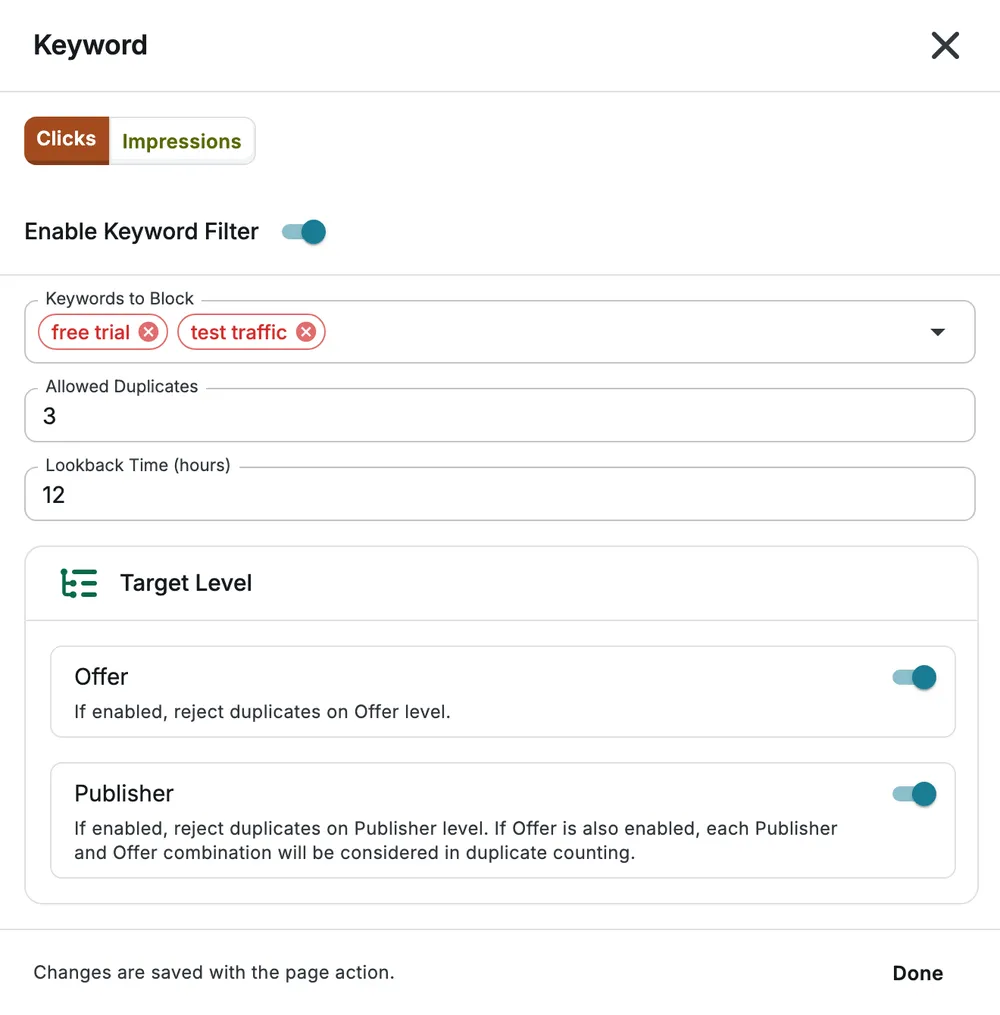
Select Done, then save the page to apply your changes.
Example
Section titled “Example”To reject requests whose keyword contains test traffic, add it to Keywords to Block. Avoid overly broad substrings that also match legitimate search terms. To limit repetition of other search terms within one publisher’s offer traffic, enable both target levels and choose the allowed count and lookback. Do not use a zero duplicate limit.
For identity-based repetition rather than keyword values, use Duplicate Event.