

Download center
Download Center lists queued raw-log exports. It is separate from direct Overview CSV downloads and from retention of the underlying report records.
Where to find exported reports
Section titled “Where to find exported reports”- Open Reports → Download Center.
- Find the intended report using integration, type, date range, and requester context.
- Review its status and output row count.
- Download the prepared file when the job is completed.
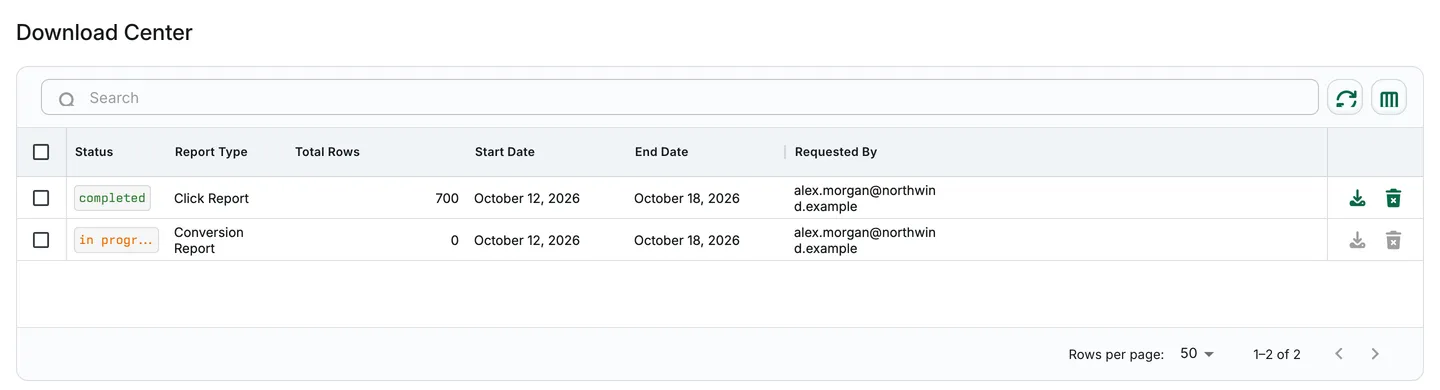
Illustrative synthetic jobs: 700 invented click rows in a completed export and zero output rows so far in an in-progress conversion export. The in-progress job’s Download and Delete actions are disabled.
Exportable data
Section titled “Exportable data”Queued exports include click, conversion, postback, and impression logs where available. Overview reports generate a CSV directly instead of creating a job here.
Important considerations
Section titled “Important considerations”- Statuses include pending, in progress, completed, error, and cancelled.
- An in-progress output count is not a final result count.
- If a job fails, review the status and selected scope before retrying from the source report. Completion time is not guaranteed.
- File availability, signed download-link expiry, and report-data retention are different concepts. Do not assume a universal retention period, daily request quota, or maximum row count.
- Treat downloaded files as sensitive if their selected fields include identifiers.
For submission steps, see Export reports.